Ask Agents about your members, money and classes, have it do tasks for you, and approve each change before it happens.
Ask Agents anything about your organization in plain words. It can also do the work for you, like adding a member to a program or sending a message. You approve every change first.Go to: Agents → New task
1
Open Agents
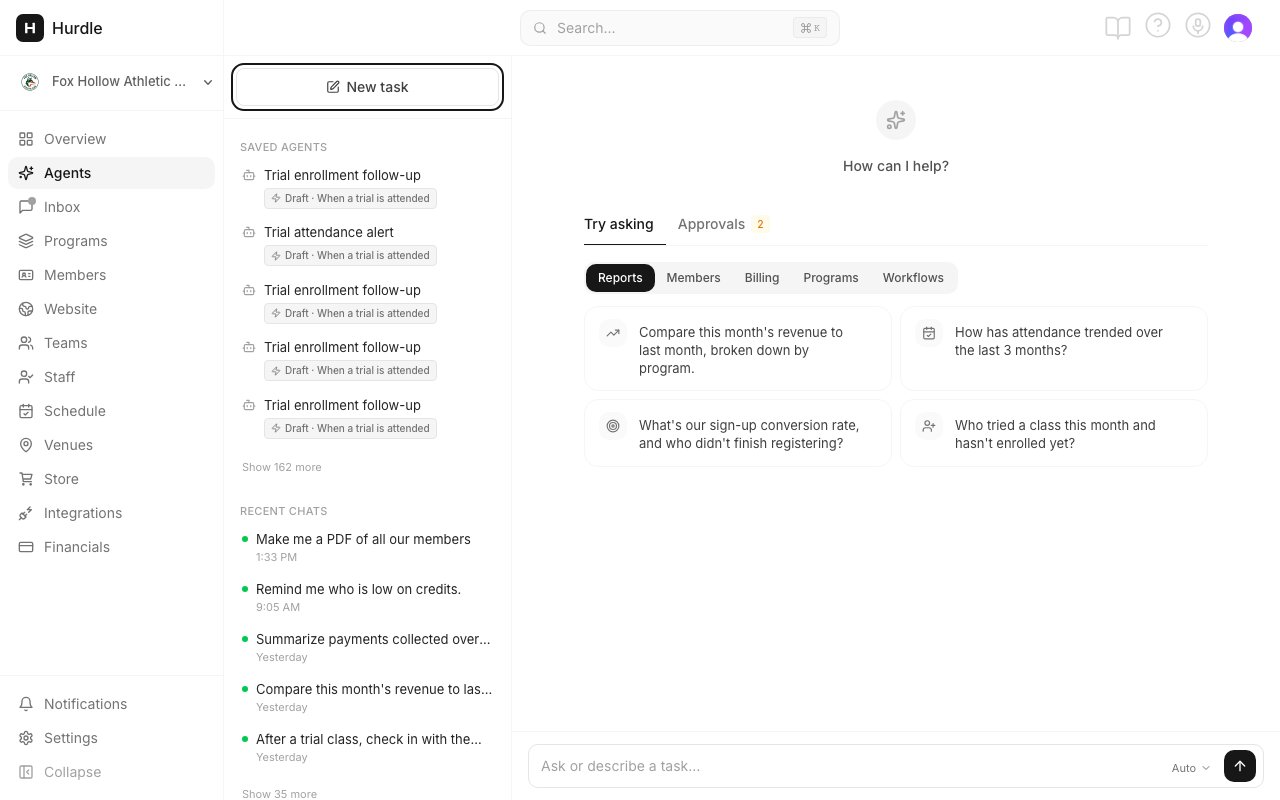
In the menu on the left, click Agents. Click New task to start fresh.
Type in the box at the bottom. Saved agents and Recent chats are on the left.
2
Type your question or task
Be specific. “Show members who registered last week” works better than “show me some members”. You do not need special words: “Who hasn’t paid?” works as well as “show pending payments”.
3
Ask follow-ups
Agents remembers the conversation. After “Show Spring Soccer sign-ups”, you can say “now only ages 6 to 8”.
4
Approve any changes
When a task changes something, Agents shows a card first. Read it, then click Approve. Nothing changes until you do.
Things to try
“How many active members do we have?”
“What’s our revenue this month?”
“Which programs are full?”
“Which payment plans aren’t billed on the 1st?”
“Add Maya Patel to Swim Lessons”
“Refund Leo Garcia’s Spring Soccer registration”
“How do I add a discount code?” Agents finds the help article and names the page, tab and heading. If there is no article for it, it says so.
Run a task on a schedule
Send the task and when it should run in one message, like “Every Monday at 8am, email me who is low on credits.” Agents saves it under Saved agents on the left. See Run an agent on a schedule.
Common questions
A name matches more than one person or class
Agents shows the possible matches with details, like an email or a date and time. Tap the right one and the task carries on in the same chat. When two members share a name, it always asks. It never picks one for you.
I didn't name a program
If a task needs a program, like “show the waitlist”, Agents lists your running programs. Pick one and it carries on.
One request needs several approvals
Approve them in any order, all at once or over a few days. Each one runs when you approve it. Anything still waiting after 7 days expires and nothing is sent or changed.
The card says the action can't go through
Before you approve, the card checks the action can work, like a card on file or money left to refund. If it can’t, the card tells you why.
An approved change didn't go through
Agents says why when it knows, like “no members matched those names”, and that nothing was sent or changed. Ask it to try again, or tell it what to change.
Who teaches each class on a day?
Ask for a day’s classes, like “Tuesday Dec 1”. Dates are your organization’s days, in its time zone. Each class shows who teaches it and its seat limit. Ask for one instructor’s classes, like “Victor’s lessons on Tuesday”. A class roster marks trials, makeups and cancelled bookings.
Which payment plans or memberships bill on a certain day?
Ask in your own words, like “Which subscriptions aren’t billed on the 1st?” or “Who is charged on December 13?”. Agents checks every payment plan and membership, not only the first rows it shows. The count in its answer covers all of them. Each row shows the next charge date and amount. To move a date, see Edit a family’s payments.
Show me an email Agents sent
Ask for it, like “show me the email you sent to Tim”. Agents shows the whole message as sent, not only its first line.
Agents drafted a message to a family. Which link does it use?
A draft that offers a trial, registration or payment uses the link for that program or payment. It never uses your homepage as a sign-up link. You still approve before anything sends.
How do I set up a scheduled agent?
Type the task and the time together, like “Every weekday at 8am, email me which members are low on credits.” It is saved under Saved agents. See Run an agent on a schedule.
Where are my saved agents?
In Agents, look in the left rail under Saved agents. Your past conversations are under Recent chats.
{"docsConfig":{"theme":"maple","$schema":"https://mintlify.com/docs.json","name":"Hurdle Docs","description":"Plain, step-by-step help for running your club, studio, school or camp on Hurdle: programs, registration, payments, scheduling, messages and more.","colors":{"primary":"#171717","light":"#FAFAFA","dark":"#171717"},"logo":{"light":"https://mintcdn.com/hurdle/OEdoWpwUhwUawPT7/logo/light.svg?fit=max\u0026auto=format\u0026n=OEdoWpwUhwUawPT7\u0026q=85\u0026s=fa99ce23704b2bad7d619b4361ee7db5","dark":"https://mintcdn.com/hurdle/OEdoWpwUhwUawPT7/logo/dark.svg?fit=max\u0026auto=format\u0026n=OEdoWpwUhwUawPT7\u0026q=85\u0026s=3629e6d2f2e174f213a90e7de199403f","href":"https://gohurdle.com"},"favicon":"https://mintcdn.com/hurdle/Gkb25SAJ1o10aFHl/favicon.svg?fit=max\u0026auto=format\u0026n=Gkb25SAJ1o10aFHl\u0026q=85\u0026s=c1bbe1f61ecf69703d214dbe79ee086b","appearance":{"default":"light"},"background":{"color":{"light":"#FFFFFF","dark":"#0A0A0A"}},"navbar":{"links":[{"href":"https://gohurdle.com","label":"Hurdle"}],"primary":{"type":"button","label":"Sign in","href":"https://gohurdle.com/sign-in"}},"footer":{"socials":{"website":"https://gohurdle.com"}},"search":{"prompt":"Search the docs, like \"refund\" or \"add a class\""},"seo":{"indexing":"navigable"},"fonts":{"family":"Inter"},"icons":{"library":"lucide"},"styling":{"eyebrows":"section","codeblocks":"system","latex":true},"contextual":{"options":["copy","chatgpt","claude"],"display":"header"},"metadata":{"timestamp":true},"navigation":{"pages":[]}},"deployment":{"deploymentMetadataValue":{"subdomain":"hurdle","hasAudioNarration":false,"actualSubdomain":"hurdle","customDomains":[],"gitSource":{"type":"github","owner":"arjshah","repo":"hurdle","deployBranch":"main","contentDirectory":"docs/help","isPrivate":true,"mountPath":"","label":"","_id":"6b021e5214422a8f9fe0b85d"},"entitlements":{"AI_CHAT":{"status":"ENABLED"},"WEB_MCP":{"status":"ENABLED"},"NARRATION":{"status":"ENABLED"}},"buildId":"6b088281ef987dacf5fa9463","clientVersion":"0.0.4340","searchFilterCounts":[{"language":"default","tag":"Using Hurdle","count":238},{"language":"default","tag":"Programs","count":55},{"language":"default","tag":"Payments","count":27},{"language":"default","tag":"Website","count":24},{"language":"default","tag":"Schedule","count":19},{"language":"default","tag":"Members","count":18},{"language":"default","tag":"Messages","count":16},{"language":"default","tag":"Integrations","count":13},{"language":"default","tag":"AI agents","count":12},{"language":"default","tag":"Appointments","count":12}]},"assistantConfig":{"enableAskAiButton":false,"enableStarterQuestions":false,"enableContextualStarterQuestions":false,"enableAskAiSearchBar":true},"basePath":"/docs","hasChatPermissions":true,"hasWebMcpPermissions":true,"toggles":[{"name":"kill-isr","enabled":true,"variant":{"name":"disabled","enabled":false,"feature_enabled":true},"impressionData":false},{"name":"custom-rbac-roles","enabled":true,"variant":{"name":"disabled","enabled":false,"feature_enabled":true},"impressionData":false},{"name":"agent-mintlify-slack","enabled":true,"variant":{"name":"disabled","enabled":false,"feature_enabled":true},"impressionData":false},{"name":"agent-integrations-settings","enabled":true,"variant":{"name":"disabled","enabled":false,"feature_enabled":true},"impressionData":false},{"name":"rbac-expansion","enabled":true,"variant":{"name":"disabled","enabled":false,"feature_enabled":true},"impressionData":false},{"name":"automations-pr-grouping","enabled":true,"variant":{"name":"disabled","enabled":false,"feature_enabled":true},"impressionData":false},{"name":"custom-prefix","enabled":true,"variant":{"name":"disabled","enabled":false,"feature_enabled":true},"impressionData":false},{"name":"analytics-v7","enabled":true,"variant":{"name":"disabled","enabled":false,"feature_enabled":true},"impressionData":false},{"name":"user-flows-analytics","enabled":true,"variant":{"name":"disabled","enabled":false,"feature_enabled":true},"impressionData":false},{"name":"no-publish-flow","enabled":true,"variant":{"name":"disabled","enabled":false,"feature_enabled":true},"impressionData":false},{"name":"snapshot-serving-live","enabled":true,"variant":{"name":"disabled","enabled":false,"feature_enabled":true},"impressionData":false},{"name":"stripTemperatureMiddleware","enabled":true,"variant":{"name":"disabled","enabled":false,"feature_enabled":true},"impressionData":false},{"name":"support-platform-pylon-zendesk","enabled":true,"variant":{"name":"disabled","enabled":false,"feature_enabled":true},"impressionData":false},{"name":"snapshot-serving","enabled":true,"variant":{"name":"disabled","enabled":false,"feature_enabled":true},"impressionData":false},{"name":"instant-rollback","enabled":true,"variant":{"name":"disabled","enabled":false,"feature_enabled":true},"impressionData":false},{"name":"granular-notifications-server","enabled":true,"variant":{"name":"disabled","enabled":false,"feature_enabled":true},"impressionData":false},{"name":"granular-notifications","enabled":true,"variant":{"name":"disabled","enabled":false,"feature_enabled":true},"impressionData":false},{"name":"automations-fable","enabled":true,"variant":{"name":"disabled","enabled":false,"feature_enabled":true},"impressionData":false},{"name":"fixed-ai-action-pricing","enabled":true,"variant":{"name":"disabled","enabled":false,"feature_enabled":true},"impressionData":false},{"name":"site-roles","enabled":true,"variant":{"name":"disabled","enabled":false,"feature_enabled":true},"impressionData":false},{"name":"automation-resolve-merge-conflict","enabled":true,"variant":{"name":"disabled","enabled":false,"feature_enabled":true},"impressionData":false},{"name":"scoped-publishing","enabled":true,"variant":{"name":"disabled","enabled":false,"feature_enabled":true},"impressionData":false},{"name":"mintql","enabled":true,"variant":{"name":"disabled","enabled":false,"feature_enabled":true},"impressionData":false},{"name":"page-level-analytics","enabled":true,"variant":{"name":"disabled","enabled":false,"feature_enabled":true},"impressionData":false},{"name":"editor-version-history-v2","enabled":true,"variant":{"name":"disabled","enabled":false,"feature_enabled":true},"impressionData":false},{"name":"billing-page-v2","enabled":true,"variant":{"name":"disabled","enabled":false,"feature_enabled":true},"impressionData":false},{"name":"full-page-search","enabled":true,"variant":{"name":"disabled","enabled":false,"feature_enabled":true},"impressionData":false},{"name":"workspace-projects","enabled":true,"variant":{"name":"disabled","enabled":false,"feature_enabled":true},"impressionData":false},{"name":"fork-pr-previews","enabled":true,"variant":{"name":"disabled","enabled":false,"feature_enabled":true},"impressionData":false},{"name":"revalidation-jwt","enabled":true,"variant":{"name":"disabled","enabled":false,"feature_enabled":true},"impressionData":false},{"name":"hobby-abuse-scan","enabled":true,"variant":{"name":"disabled","enabled":false,"feature_enabled":true},"impressionData":false},{"name":"dashboard-inbox","enabled":true,"variant":{"name":"disabled","enabled":false,"feature_enabled":true},"impressionData":false},{"name":"turbopuffer-dual-write","enabled":true,"variant":{"name":"disabled","enabled":false,"feature_enabled":true},"impressionData":false},{"name":"approve-review-flow","enabled":true,"variant":{"name":"disabled","enabled":false,"feature_enabled":true},"impressionData":false},{"name":"editor-metadata","enabled":true,"variant":{"name":"disabled","enabled":false,"feature_enabled":true},"impressionData":false},{"name":"turbopuffer-serve","enabled":true,"variant":{"name":"disabled","enabled":false,"feature_enabled":true},"impressionData":false},{"name":"live-agents","enabled":true,"variant":{"name":"disabled","enabled":false,"feature_enabled":true},"impressionData":false},{"name":"starter-pricing","enabled":true,"variant":{"name":"treatment","enabled":true,"payload":{"type":"string","value":"treatment"},"feature_enabled":true},"impressionData":false},{"name":"llms-txt-v2","enabled":true,"variant":{"name":"disabled","enabled":false,"feature_enabled":true},"impressionData":false},{"name":"wildcard-email-auth","enabled":true,"variant":{"name":"disabled","enabled":false,"feature_enabled":true},"impressionData":false}],"starterQuestions":[],"googleFontsInlined":false},"customCss":[{"filePath":"style.css","content":":root{--hd-ink: #171717;--hd-body: #404040;--hd-muted: #737373;--hd-faint: #a3a3a3;--hd-line: #f5f5f5;--hd-line-strong: #e5e5e5;--hd-fill: #fafafa;--hd-fill-hover: #f5f5f5}:root.dark{--hd-ink: #fafafa;--hd-body: #d4d4d4;--hd-muted: #a3a3a3;--hd-faint: #737373;--hd-line: #1f1f1f;--hd-line-strong: #2a2a2a;--hd-fill: #141414;--hd-fill-hover: #1a1a1a}#content-area *,[data-layout-item=\"topbar\"],[data-layout-item=\"sidebar\"],.card{box-shadow:none!important}[data-layout-item=\"topbar\"]{border-bottom:1px solid var(--hd-line)!important;backdrop-filter:none!important}[data-layout-item=\"sidebar\"]{border-color:var(--hd-line)!important}#sidebar-content a,#sidebar-content button{font-size:0.8125rem}#sidebar-content li[data-active]>a,#sidebar-content li[data-active]{color:var(--hd-ink)!important;font-weight:500}.sidebar-group-header,#sidebar-content h5{font-size:0.75rem!important;font-weight:500!important;letter-spacing:0.02em;color:var(--hd-faint)!important;text-transform:uppercase}[data-layout-item=\"search-entry\"]{border:1px solid var(--hd-line-strong)!important;border-radius:8px!important;background:var(--hd-fill)!important}#header,[data-layout-item=\"page-header\"]{margin-bottom:1.75rem}#page-title{font-size:1.75rem!important;line-height:2.25rem!important;font-weight:600!important;letter-spacing:-0.02em;color:var(--hd-ink)!important}.eyebrow,[data-layout-item=\"page-header\"] .eyebrow{font-size:0.75rem!important;font-weight:500!important;letter-spacing:0.02em;text-transform:uppercase;color:var(--hd-faint)!important}[data-layout-item=\"page-header\"] p,#header p{font-size:1rem;line-height:1.6rem;color:var(--hd-muted)!important}#content-area{color:var(--hd-body)}#content-area h2:not([data-component-part]){font-size:1.25rem!important;line-height:1.75rem!important;font-weight:600!important;letter-spacing:-0.01em;color:var(--hd-ink)!important;margin-top:2.5rem!important}#content-area h3:not([data-component-part]){font-size:1rem!important;font-weight:600!important;color:var(--hd-ink)!important}#content-area strong{color:var(--hd-ink);font-weight:600}#content-area a:not(.card):not([data-component-part]){color:var(--hd-ink);text-decoration:underline;text-decoration-color:var(--hd-line-strong);text-underline-offset:3px;border-bottom:0!important}#content-area a:not(.card):not([data-component-part]):hover{text-decoration-color:var(--hd-ink)}#content-area code:not(pre code){font-size:0.85em;padding:0.1em 0.35em;border-radius:4px;border:1px solid var(--hd-line-strong);background:var(--hd-fill);color:var(--hd-ink)}#content-area hr{border-color:var(--hd-line)}.card{border:1px solid var(--hd-line-strong)!important;border-radius:12px!important;background:transparent!important;transition:border-color 150ms ease, background-color 150ms ease}.card:hover{border-color:var(--hd-faint)!important;background:var(--hd-fill)!important}.card [data-component-part=\"card-content-container\"]{display:flex;align-items:flex-start;gap:12px;padding:16px 18px!important}[data-component-part=\"card-icon\"]{flex:none;width:16px!important;height:16px!important;margin-top:2px;color:var(--hd-ink)!important;fill:none!important}[data-component-part=\"card-icon\"]>svg{width:16px!important;height:16px!important}[data-component-part=\"card-title\"]{margin-top:0!important;font-size:0.875rem!important;line-height:1.25rem!important;font-weight:600!important;color:var(--hd-ink)!important}[data-component-part=\"card-content\"]{margin-top:2px!important;font-size:0.8125rem!important;line-height:1.25rem!important;color:var(--hd-muted)!important}[data-component-part=\"step-indicator\"]{width:1.5rem!important;height:1.5rem!important;margin-left:2px;background:var(--hd-ink)!important;color:#fff!important;font-weight:500!important}:root.dark [data-component-part=\"step-indicator\"]{color:#0a0a0a!important}[data-component-part=\"step-line\"]{background:var(--hd-line-strong)!important}[data-component-part=\"step-title\"]{font-weight:600!important;color:var(--hd-ink)!important}#content-area img{border-radius:10px}.frame,[data-name=\"frame\"],#content-area figure{border:1px solid var(--hd-line-strong)!important;border-radius:12px!important;background:var(--hd-fill)!important;padding:0!important;overflow:hidden}.frame img,[data-name=\"frame\"] img,#content-area figure img{border-radius:0!important;margin:0!important}[data-component-part=\"frame-caption\"],#content-area figcaption{font-size:0.8125rem;color:var(--hd-muted)}.callout{border-width:1px!important;border-radius:10px!important;font-size:0.875rem}#content-area table{font-size:0.875rem}#content-area th{font-size:0.75rem;font-weight:500;letter-spacing:0.02em;text-transform:uppercase;color:var(--hd-muted);border-bottom:1px solid var(--hd-line-strong)!important}#content-area td{border-color:var(--hd-line)!important}toc-item,#table-of-contents a{font-size:0.8125rem}toc-item[data-active-deepest] a,#table-of-contents a[data-active]{color:var(--hd-ink)!important;font-weight:500}[data-layout-item=\"pagination\"] a{border:1px solid var(--hd-line-strong)!important;border-radius:10px!important;box-shadow:none!important}[data-layout-item=\"footer\"]{border-top:1px solid var(--hd-line)}#content-area [data-layout-item=\"page-header\"],#content-area .\\@container\\/page-header{margin-bottom:0!important}#content-area #content.mdx-content{margin-top:1.5rem!important}"}]}
{"page":{"pagePath":"agents/ask-ai","slug":"/agents/ask-ai","pageMetadata":{"title":"Ask AI a question or give it a task","sidebarTitle":"Ask AI","description":"Ask Agents about your members, money and classes, have it do tasks for you, and approve each change before it happens.","type":"task","aiTopic":"agents","keywords":["ask ai","agents","ai chat","new task","approve","approval card","scheduled agent","saved agents","recent chats","how do i","ai assistant"],"covers":["app/(dashboard)/dashboard/ask/**","src/components/ai-agents/agents-panel.tsx","src/components/ai-chat/**"],"screenshots":[{"id":"agents-new-task","url":"/dashboard/ask","highlight":"New task","alt":"The Agents page with the New task button, Saved agents, Recent chats and the message box"}],"href":"/agents/ask-ai"},"description":{"compiledSource":"\"use strict\";\nconst {jsx: _jsx} = arguments[0];\nconst {useMDXComponents: _provideComponents} = arguments[0];\nfunction _createMdxContent(props) {\n const _components = {\n p: \"p\",\n ..._provideComponents(),\n ...props.components\n };\n return _jsx(_components.p, {\n children: \"Ask Agents about your members, money and classes, have it do tasks for you, and approve each change before it happens.\"\n });\n}\nfunction MDXContent(props = {}) {\n const {wrapper: MDXLayout} = {\n ..._provideComponents(),\n ...props.components\n };\n return MDXLayout ? _jsx(MDXLayout, {\n ...props,\n children: _jsx(_createMdxContent, {\n ...props\n })\n }) : _createMdxContent(props);\n}\nreturn {\n default: MDXContent\n};\n","frontmatter":{},"scope":{}},"pageType":"default","mdx":{"mdxSource":{"compiledSource":"\"use strict\";const{Fragment:_Fragment,jsx:_jsx,jsxs:_jsxs}=arguments[0];const{useMDXComponents:_provideComponents}=arguments[0];function _createMdxContent(props){const _components={a:`a`,li:`li`,p:`p`,strong:`strong`,ul:`ul`,..._provideComponents(),...props.components},{Accordion,AccordionGroup,Frame,Heading,OptimizedImage,Step,Steps}=_components;if(!Accordion)_missingMdxReference(`Accordion`,true);if(!AccordionGroup)_missingMdxReference(`AccordionGroup`,true);if(!Frame)_missingMdxReference(`Frame`,true);if(!Heading)_missingMdxReference(`Heading`,true);if(!OptimizedImage)_missingMdxReference(`OptimizedImage`,true);if(!Step)_missingMdxReference(`Step`,true);if(!Steps)_missingMdxReference(`Steps`,true);return _jsxs(_Fragment,{children:[_jsx(_components.p,{children:`Ask Agents anything about your organization in plain words. It can also do the work for you, like adding a member to a program or sending a message. You approve every change first.`}),`\n`,_jsxs(_components.p,{children:[_jsx(_components.strong,{children:`Go to:`}),` Agents → New task`]}),`\n`,_jsxs(Steps,{children:[_jsxs(Step,{title:`Open Agents`,children:[_jsxs(_components.p,{children:[`In the menu on the left, click `,_jsx(_components.strong,{children:`Agents`}),`. Click `,_jsx(_components.strong,{children:`New task`}),` to start fresh.`]}),_jsx(Frame,{caption:`Type in the box at the bottom. Saved agents and Recent chats are on the left.`,children:_jsx(OptimizedImage,{src:`https://mintcdn.com/hurdle/Gkb25SAJ1o10aFHl/images/screenshots/agents-new-task.png?fit=max\u0026auto=format\u0026n=Gkb25SAJ1o10aFHl\u0026q=85\u0026s=8bb05acc52488e3749a9ec25d2d1bff9`,alt:`The Agents page with the New task button, Saved agents, Recent chats and the message box`,\"data-og-width\":`1280`,width:`1280`,\"data-og-height\":`800`,height:`800`,\"data-path\":`images/screenshots/agents-new-task.png`,\"data-optimize\":`true`,\"data-opv\":`3`,srcset:`https://mintcdn.com/hurdle/Gkb25SAJ1o10aFHl/images/screenshots/agents-new-task.png?w=280\u0026fit=max\u0026auto=format\u0026n=Gkb25SAJ1o10aFHl\u0026q=85\u0026s=8df5814984e75e12bca0feeb5dd91eb2 280w, https://mintcdn.com/hurdle/Gkb25SAJ1o10aFHl/images/screenshots/agents-new-task.png?w=560\u0026fit=max\u0026auto=format\u0026n=Gkb25SAJ1o10aFHl\u0026q=85\u0026s=faa5c879d237aab558f7df57981fe5a1 560w, https://mintcdn.com/hurdle/Gkb25SAJ1o10aFHl/images/screenshots/agents-new-task.png?w=840\u0026fit=max\u0026auto=format\u0026n=Gkb25SAJ1o10aFHl\u0026q=85\u0026s=82af46e642268d20e60f8d1380524e5c 840w, https://mintcdn.com/hurdle/Gkb25SAJ1o10aFHl/images/screenshots/agents-new-task.png?w=1100\u0026fit=max\u0026auto=format\u0026n=Gkb25SAJ1o10aFHl\u0026q=85\u0026s=b708b794aeb53a19be920019715845c2 1100w, https://mintcdn.com/hurdle/Gkb25SAJ1o10aFHl/images/screenshots/agents-new-task.png?w=1650\u0026fit=max\u0026auto=format\u0026n=Gkb25SAJ1o10aFHl\u0026q=85\u0026s=4c106d2c130e7718bbec6f845706e317 1650w, https://mintcdn.com/hurdle/Gkb25SAJ1o10aFHl/images/screenshots/agents-new-task.png?w=2500\u0026fit=max\u0026auto=format\u0026n=Gkb25SAJ1o10aFHl\u0026q=85\u0026s=dd6aa3d2e57f07fd51e78666d5df5b60 2500w`})})]}),_jsx(Step,{title:`Type your question or task`,children:_jsx(_components.p,{children:`Be specific. “Show members who registered last week” works better than “show me some members”. You do not need special words: “Who hasn’t paid?” works as well as “show pending payments”.`})}),_jsx(Step,{title:`Ask follow-ups`,children:_jsx(_components.p,{children:`Agents remembers the conversation. After “Show Spring Soccer sign-ups”, you can say “now only ages 6 to 8”.`})}),_jsx(Step,{title:`Approve any changes`,children:_jsxs(_components.p,{children:[`When a task changes something, Agents shows a card first. Read it, then click `,_jsx(_components.strong,{children:`Approve`}),`. Nothing changes until you do.`]})})]}),`\n`,_jsx(Heading,{level:`2`,id:`things-to-try`,children:`Things to try`}),`\n`,_jsxs(_components.ul,{children:[`\n`,_jsx(_components.li,{children:`“How many active members do we have?”`}),`\n`,_jsx(_components.li,{children:`“What’s our revenue this month?”`}),`\n`,_jsx(_components.li,{children:`“Which programs are full?”`}),`\n`,_jsx(_components.li,{children:`“Which payment plans aren’t billed on the 1st?”`}),`\n`,_jsx(_components.li,{children:`“Add Maya Patel to Swim Lessons”`}),`\n`,_jsx(_components.li,{children:`“Refund Leo Garcia’s Spring Soccer registration”`}),`\n`,_jsx(_components.li,{children:`“How do I add a discount code?” Agents finds the help article and names the page, tab and heading. If there is no article for it, it says so.`}),`\n`]}),`\n`,_jsx(Heading,{level:`2`,id:`run-a-task-on-a-schedule`,children:`Run a task on a schedule`}),`\n`,_jsxs(_components.p,{children:[`Send the task and when it should run in one message, like “Every Monday at 8am, email me who is low on credits.” Agents saves it under `,_jsx(_components.strong,{children:`Saved agents`}),` on the left. See `,_jsx(_components.a,{href:`/agents/scheduled-agents`,children:`Run an agent on a schedule`}),`.`]}),`\n`,_jsx(Heading,{level:`2`,id:`common-questions`,children:`Common questions`}),`\n`,_jsxs(AccordionGroup,{children:[_jsx(Accordion,{title:`A name matches more than one person or class`,id:`a-name-matches-more-than-one-person-or-class`,children:_jsx(_components.p,{children:`Agents shows the possible matches with details, like an email or a date and time. Tap the right one and the task carries on in the same chat. When two members share a name, it always asks. It never picks one for you.`})}),_jsx(Accordion,{title:`I didn't name a program`,id:`i-didnt-name-a-program`,children:_jsx(_components.p,{children:`If a task needs a program, like “show the waitlist”, Agents lists your running programs. Pick one and it carries on.`})}),_jsx(Accordion,{title:`One request needs several approvals`,id:`one-request-needs-several-approvals`,children:_jsx(_components.p,{children:`Approve them in any order, all at once or over a few days. Each one runs when you approve it. Anything still waiting after 7 days expires and nothing is sent or changed.`})}),_jsx(Accordion,{title:`The card says the action can't go through`,id:`the-card-says-the-action-cant-go-through`,children:_jsx(_components.p,{children:`Before you approve, the card checks the action can work, like a card on file or money left to refund. If it can’t, the card tells you why.`})}),_jsx(Accordion,{title:`An approved change didn't go through`,id:`an-approved-change-didnt-go-through`,children:_jsx(_components.p,{children:`Agents says why when it knows, like “no members matched those names”, and that nothing was sent or changed. Ask it to try again, or tell it what to change.`})}),_jsx(Accordion,{title:`Who teaches each class on a day?`,id:`who-teaches-each-class-on-a-day`,children:_jsx(_components.p,{children:`Ask for a day’s classes, like “Tuesday Dec 1”. Dates are your organization’s days, in its time zone. Each class shows who teaches it and its seat limit. Ask for one instructor’s classes, like “Victor’s lessons on Tuesday”. A class roster marks trials, makeups and cancelled bookings.`})}),_jsx(Accordion,{title:`Which payment plans or memberships bill on a certain day?`,id:`which-payment-plans-or-memberships-bill-on-a-certain-day`,children:_jsxs(_components.p,{children:[`Ask in your own words, like “Which subscriptions aren’t billed on the 1st?” or “Who is charged on December 13?”. Agents checks every payment plan and membership, not only the first rows it shows. The count in its answer covers all of them. Each row shows the next charge date and amount. To move a date, see `,_jsx(_components.a,{href:`/payments/payment-plans-edit-a-familys-payments`,children:`Edit a family’s payments`}),`.`]})}),_jsx(Accordion,{title:`Show me an email Agents sent`,id:`show-me-an-email-agents-sent`,children:_jsx(_components.p,{children:`Ask for it, like “show me the email you sent to Tim”. Agents shows the whole message as sent, not only its first line.`})}),_jsx(Accordion,{title:`Agents drafted a message to a family. Which link does it use?`,id:`agents-drafted-a-message-to-a-family-which-link-does-it-use`,children:_jsx(_components.p,{children:`A draft that offers a trial, registration or payment uses the link for that program or payment. It never uses your homepage as a sign-up link. You still approve before anything sends.`})}),_jsx(Accordion,{title:`How do I set up a scheduled agent?`,id:`how-do-i-set-up-a-scheduled-agent`,children:_jsxs(_components.p,{children:[`Type the task and the time together, like “Every weekday at 8am, email me which members are low on credits.” It is saved under `,_jsx(_components.strong,{children:`Saved agents`}),`. See `,_jsx(_components.a,{href:`/agents/scheduled-agents`,children:`Run an agent on a schedule`}),`.`]})}),_jsx(Accordion,{title:`Where are my saved agents?`,id:`where-are-my-saved-agents`,children:_jsxs(_components.p,{children:[`In `,_jsx(_components.strong,{children:`Agents`}),`, look in the left rail under `,_jsx(_components.strong,{children:`Saved agents`}),`. Your past conversations are under `,_jsx(_components.strong,{children:`Recent chats`}),`.`]})})]}),`\n`,_jsx(Heading,{level:`2`,id:`related`,children:`Related`}),`\n`,_jsxs(_components.ul,{children:[`\n`,_jsx(_components.li,{children:_jsx(_components.a,{href:`/agents/scheduled-agents`,children:`Run an agent on a schedule`})}),`\n`,_jsx(_components.li,{children:_jsx(_components.a,{href:`/agents/memory`,children:`Memory`})}),`\n`,_jsx(_components.li,{children:_jsx(_components.a,{href:`/agents/reports`,children:`Reports, lists and metrics`})}),`\n`]})]})}function MDXContent(props={}){const{wrapper:MDXLayout}={..._provideComponents(),...props.components};return MDXLayout?_jsx(MDXLayout,{...props,children:_jsx(_createMdxContent,{...props})}):_createMdxContent(props)}return{default:MDXContent};function _missingMdxReference(id,component){throw new Error(`Expected `+(component?`component`:`object`)+\" `\"+id+\"` to be defined: you likely forgot to import, pass, or provide it.\")}","frontmatter":{},"scope":{"codeStyling":"system","config":{},"pageMetadata":{"title":"Ask AI a question or give it a task","sidebarTitle":"Ask AI","description":"Ask Agents about your members, money and classes, have it do tasks for you, and approve each change before it happens.","type":"task","aiTopic":"agents","keywords":["ask ai","agents","ai chat","new task","approve","approval card","scheduled agent","saved agents","recent chats","how do i","ai assistant"],"covers":["app/(dashboard)/dashboard/ask/**","src/components/ai-agents/agents-panel.tsx","src/components/ai-chat/**"],"screenshots":[{"id":"agents-new-task","url":"/dashboard/ask","highlight":"New task","alt":"The Agents page with the New task button, Saved agents, Recent chats and the message box"}],"href":"/agents/ask-ai"}}},"mdxSourceWithNoJs":null},"mdxExtracts":{"tableOfContents":[{"title":"Things to try","slug":"things-to-try","depth":2,"children":[]},{"title":"Run a task on a schedule","slug":"run-a-task-on-a-schedule","depth":2,"children":[]},{"title":"Common questions","slug":"common-questions","depth":2,"children":[]},{"title":"Related","slug":"related","depth":2,"children":[]}],"codeExamples":{}},"jsLinks":[],"subdomain":"hurdle","siteName":"Hurdle Docs","title":"Ask AI a question or give it a task - Hurdle Docs","contextualStarterQuestions":[],"navMaps":{"firstHrefInVersion":{},"firstHrefInLanguage":{}},"lastModified":"2026-11-25T19:57:13.556Z","gitLastModified":"2026-11-25T19:56:49.000Z","originalFileLocation":"agents/ask-ai.mdx"},"headHtml":"\u003cscript data-mint-head>(function(){var d=document.documentElement,p=null;if(!p){try{p=localStorage.getItem(\"isDarkMode\")}catch(e){}if(p==='true')p='dark';else if(p==='false')p='light';if(p!=='light'\u0026\u0026p!=='dark'\u0026\u0026p!=='system')p=\"light\"}var r=p==='system'?(matchMedia(\"(prefers-color-scheme: dark)\").matches?'dark':'light'):p;d.classList.remove(r==='dark'?'light':'dark');d.classList.add(r);d.setAttribute(\"data-theme-preference\",p)})();\u003c/script>\u003cmeta data-mint-head name=\"description\" content=\"Ask Agents about your members, money and classes, have it do tasks for you, and approve each change before it happens.\">\u003cmeta data-mint-head name=\"application-name\" content=\"Hurdle Docs\">\u003cmeta data-mint-head name=\"generator\" content=\"Mintlify\">\u003clink data-mint-head rel=\"icon\" type=\"image/png\" sizes=\"192x192\" href=\"/docs/mintlify-assets/_mintlify/favicons/hurdle/FdO0UEhyHHA-CN6A/_generated/favicon/android-chrome-192x192.png\" media=\"(prefers-color-scheme: light)\">\u003clink data-mint-head rel=\"apple-touch-icon\" type=\"image/png\" sizes=\"180x180\" href=\"/docs/mintlify-assets/_mintlify/favicons/hurdle/FdO0UEhyHHA-CN6A/_generated/favicon/apple-touch-icon.png\">\u003clink data-mint-head rel=\"icon\" type=\"image/png\" sizes=\"16x16\" href=\"/docs/mintlify-assets/_mintlify/favicons/hurdle/FdO0UEhyHHA-CN6A/_generated/favicon/favicon-16x16.png\" media=\"(prefers-color-scheme: light)\">\u003clink data-mint-head rel=\"icon\" type=\"image/png\" sizes=\"32x32\" href=\"/docs/mintlify-assets/_mintlify/favicons/hurdle/FdO0UEhyHHA-CN6A/_generated/favicon/favicon-32x32.png\" media=\"(prefers-color-scheme: light)\">\u003clink data-mint-head rel=\"shortcut icon\" type=\"image/x-icon\" href=\"/docs/mintlify-assets/_mintlify/favicons/hurdle/FdO0UEhyHHA-CN6A/_generated/favicon/favicon.ico\" media=\"(prefers-color-scheme: light)\">\u003clink data-mint-head rel=\"icon\" type=\"image/png\" sizes=\"192x192\" href=\"/docs/mintlify-assets/_mintlify/favicons/hurdle/FdO0UEhyHHA-CN6A/_generated/favicon-dark/android-chrome-192x192.png\" media=\"(prefers-color-scheme: dark)\">\u003clink data-mint-head rel=\"icon\" type=\"image/png\" sizes=\"16x16\" href=\"/docs/mintlify-assets/_mintlify/favicons/hurdle/FdO0UEhyHHA-CN6A/_generated/favicon-dark/favicon-16x16.png\" media=\"(prefers-color-scheme: dark)\">\u003clink data-mint-head rel=\"icon\" type=\"image/png\" sizes=\"32x32\" href=\"/docs/mintlify-assets/_mintlify/favicons/hurdle/FdO0UEhyHHA-CN6A/_generated/favicon-dark/favicon-32x32.png\" media=\"(prefers-color-scheme: dark)\">\u003clink data-mint-head rel=\"shortcut icon\" type=\"image/x-icon\" href=\"/docs/mintlify-assets/_mintlify/favicons/hurdle/FdO0UEhyHHA-CN6A/_generated/favicon-dark/favicon.ico\" media=\"(prefers-color-scheme: dark)\">\u003cmeta data-mint-head property=\"og:title\" content=\"Ask AI a question or give it a task - Hurdle Docs\">\u003cmeta data-mint-head property=\"og:description\" content=\"Ask Agents about your members, money and classes, have it do tasks for you, and approve each change before it happens.\">\u003cmeta data-mint-head property=\"og:site_name\" content=\"Hurdle Docs\">\u003cmeta data-mint-head property=\"og:url\" content=\"https://hurdle.mintlify.dev/docs/agents/ask-ai\">\u003cmeta data-mint-head property=\"og:type\" content=\"website\">\u003cmeta data-mint-head property=\"og:image\" content=\"https://hurdle.mintlify.site/docs/_mintlify/api/og/v2?division=AI+agents\u0026amp;title=Ask+AI+a+question+or+give+it+a+task\u0026amp;description=Ask+Agents+about+your+members%2C+money+and+classes%2C+have+it+do+tasks+for+you%2C+and+approve+each+change+before+it+happens.\u0026amp;theme=cfa195a1861a5177f91f4caa\u0026amp;signature=f1bef1be1992859fea7ccc3e70a243d363d1a01f58f8dc811fb0dc0847a38b09\">\u003cmeta data-mint-head property=\"og:image:width\" content=\"1200\">\u003cmeta data-mint-head property=\"og:image:height\" content=\"630\">\u003cmeta data-mint-head name=\"twitter:card\" content=\"summary_large_image\">\u003cmeta data-mint-head name=\"twitter:title\" content=\"Ask AI a question or give it a task - Hurdle Docs\">\u003cmeta data-mint-head name=\"twitter:description\" content=\"Ask Agents about your members, money and classes, have it do tasks for you, and approve each change before it happens.\">\u003cmeta data-mint-head name=\"twitter:image\" content=\"https://hurdle.mintlify.site/docs/_mintlify/api/og/v2?division=AI+agents\u0026amp;title=Ask+AI+a+question+or+give+it+a+task\u0026amp;description=Ask+Agents+about+your+members%2C+money+and+classes%2C+have+it+do+tasks+for+you%2C+and+approve+each+change+before+it+happens.\u0026amp;theme=cfa195a1861a5177f91f4caa\u0026amp;signature=f1bef1be1992859fea7ccc3e70a243d363d1a01f58f8dc811fb0dc0847a38b09\">\u003cmeta data-mint-head name=\"twitter:image:width\" content=\"1200\">\u003cmeta data-mint-head name=\"twitter:image:height\" content=\"630\">\u003cmeta data-mint-head name=\"msapplication-config\" content=\"/docs/mintlify-assets/_mintlify/favicons/hurdle/FdO0UEhyHHA-CN6A/_generated/favicon/browserconfig.xml\">\u003cmeta data-mint-head name=\"apple-mobile-web-app-title\" content=\"Hurdle Docs\">\u003cmeta data-mint-head name=\"msapplication-TileColor\" content=\"#171717\">\u003clink data-mint-head rel=\"canonical\" href=\"https://hurdle.mintlify.dev/docs/agents/ask-ai\">\u003clink data-mint-head rel=\"alternate\" type=\"application/xml\" href=\"/docs/sitemap.xml\">\u003clink data-mint-head rel=\"alternate\" type=\"text/markdown\" href=\"/docs/agents/ask-ai.md\">\u003cscript data-mint-head type=\"application/ld+json\">{\"@context\":\"https://schema.org\",\"@graph\":[{\"@type\":\"Organization\",\"@id\":\"https://hurdle.mintlify.dev/#organization\",\"name\":\"Hurdle Docs\",\"url\":\"https://hurdle.mintlify.dev\",\"logo\":{\"@type\":\"ImageObject\",\"url\":\"https://mintcdn.com/hurdle/OEdoWpwUhwUawPT7/logo/light.svg?fit=max\u0026auto=format\u0026n=OEdoWpwUhwUawPT7\u0026q=85\u0026s=fa99ce23704b2bad7d619b4361ee7db5\"}},{\"@type\":\"WebSite\",\"@id\":\"https://hurdle.mintlify.dev/docs#website\",\"name\":\"Hurdle Docs\",\"url\":\"https://hurdle.mintlify.dev/docs\",\"publisher\":{\"@id\":\"https://hurdle.mintlify.dev/#organization\"}},{\"@type\":\"WebPage\",\"@id\":\"https://hurdle.mintlify.dev/docs/agents/ask-ai#webpage\",\"url\":\"https://hurdle.mintlify.dev/docs/agents/ask-ai\",\"name\":\"Ask AI a question or give it a task\",\"description\":\"Ask Agents about your members, money and classes, have it do tasks for you, and approve each change before it happens.\",\"dateModified\":\"2026-11-25T19:56:49.000Z\",\"isPartOf\":{\"@id\":\"https://hurdle.mintlify.dev/docs#website\"},\"breadcrumb\":{\"@id\":\"https://hurdle.mintlify.dev/docs/agents/ask-ai#breadcrumb\"}},{\"@type\":\"BreadcrumbList\",\"@id\":\"https://hurdle.mintlify.dev/docs/agents/ask-ai#breadcrumb\",\"itemListElement\":[{\"@type\":\"ListItem\",\"position\":1,\"name\":\"Using Hurdle\",\"item\":\"https://hurdle.mintlify.dev/docs/dashboard/your-dashboard\"},{\"@type\":\"ListItem\",\"position\":2,\"name\":\"AI agents\",\"item\":\"https://hurdle.mintlify.dev/docs/agents/overview\"},{\"@type\":\"ListItem\",\"position\":3,\"name\":\"Ask AI a question or give it a task\",\"item\":\"https://hurdle.mintlify.dev/docs/agents/ask-ai\"}]},{\"@type\":[\"Article\",\"TechArticle\"],\"@id\":\"https://hurdle.mintlify.dev/docs/agents/ask-ai#article\",\"headline\":\"Ask AI a question or give it a task\",\"name\":\"Ask AI a question or give it a task\",\"description\":\"Ask Agents about your members, money and classes, have it do tasks for you, and approve each change before it happens.\",\"url\":\"https://hurdle.mintlify.dev/docs/agents/ask-ai\",\"mainEntityOfPage\":{\"@id\":\"https://hurdle.mintlify.dev/docs/agents/ask-ai#webpage\"},\"dateModified\":\"2026-11-25T19:56:49.000Z\",\"keywords\":\"ask ai, agents, ai chat, new task, approve, approval card, scheduled agent, saved agents, recent chats, how do i, ai assistant\",\"publisher\":{\"@id\":\"https://hurdle.mintlify.dev/#organization\"},\"isPartOf\":{\"@id\":\"https://hurdle.mintlify.dev/docs#website\"}}]}\u003c/script>\u003cscript data-mint-head type=\"application/ld+json\">{\"@context\":\"https://schema.org\",\"@type\":\"WebSite\",\"name\":\"Hurdle Docs\",\"publisher\":{\"@type\":\"Organization\",\"name\":\"Hurdle Docs\"},\"provider\":{\"@type\":\"Organization\",\"name\":\"Mintlify\",\"url\":\"https://mintlify.com\"}}\u003c/script>","agentPointerHref":"/docs/agents/ask-ai.md","siteName":"Hurdle Docs","nav":{"global":null,"groups":[{"group":"Get started","pages":[{"title":"Welcome to Hurdle","sidebarTitle":"Welcome","href":"/index"},{"title":"Set up your organization","sidebarTitle":"Set up your organization","href":"/get-started/set-up-your-organization"},{"title":"Connect Stripe to take payments","sidebarTitle":"Connect Stripe","href":"/get-started/connect-stripe"},{"title":"Add the places you meet","sidebarTitle":"Add venues","href":"/get-started/venues"},{"title":"Create your first program","sidebarTitle":"Create your first program","href":"/get-started/create-your-first-program"},{"title":"Share your registration page","sidebarTitle":"Share your registration page","href":"/get-started/share-your-registration-page"},{"title":"Take your first registration","sidebarTitle":"Your first registration","href":"/get-started/take-your-first-registration"},{"title":"Your Hurdle subscription","sidebarTitle":"Your Hurdle subscription","href":"/get-started/your-hurdle-subscription"},{"title":"What to do next","sidebarTitle":"What's next","href":"/get-started/whats-next"}]},{"group":"Core concepts","pages":[{"title":"How Hurdle works","sidebarTitle":"How Hurdle works","href":"/concepts/how-hurdle-works"},{"title":"Programs, classes and events","sidebarTitle":"Programs and classes","href":"/concepts/programs-and-classes"},{"title":"Members and families","sidebarTitle":"Members and families","href":"/concepts/members-and-families"},{"title":"Prices and billing","sidebarTitle":"Prices and billing","href":"/concepts/prices-and-billing"},{"title":"Memberships and credit packs","sidebarTitle":"Memberships and credit packs","href":"/concepts/memberships-and-credit-packs"},{"title":"Registrations, waitlists and leads","sidebarTitle":"Registrations and waitlists","href":"/concepts/registrations-and-waitlists"},{"title":"Staff and roles","sidebarTitle":"Staff and roles","href":"/concepts/staff-and-roles"},{"title":"Your website and member app","sidebarTitle":"Website and member app","href":"/concepts/your-website-and-member-app"},{"title":"AI agents","sidebarTitle":"AI agents","href":"/concepts/ai-agents"},{"title":"Glossary","sidebarTitle":"Glossary","href":"/concepts/glossary"}]},{"group":"Using Hurdle","pages":[{"group":"Your dashboard","expanded":false,"pages":[{"title":"Your dashboard brief","sidebarTitle":"Your dashboard","href":"/dashboard/your-dashboard"},{"title":"What shows up in your brief","sidebarTitle":"What shows up","href":"/dashboard/brief-items"},{"title":"How Hurdle builds your brief","sidebarTitle":"How it's built","href":"/dashboard/how-the-brief-works"},{"title":"Send a message from the brief","sidebarTitle":"Send from the brief","href":"/dashboard/send-from-the-brief"},{"title":"Your monthly report","href":"/dashboard/monthly-report"},{"title":"Turn dashboard alerts off","href":"/dashboard/turn-off-alerts"}]},{"group":"Programs","expanded":false,"pages":[{"title":"Programs","href":"/programs/overview"},{"title":"Create a program","href":"/programs/create-a-program"},{"title":"Program types","href":"/programs/program-types"},{"title":"Choose how people pay","href":"/programs/choose-how-people-pay"},{"title":"Set prices with pricing tiers","sidebarTitle":"Pricing tiers","href":"/programs/pricing-tiers"},{"title":"Set a minimum commitment","sidebarTitle":"Minimum commitment","href":"/programs/minimum-commitment"},{"title":"Show ages on a program","sidebarTitle":"Age groups","href":"/programs/age-groups"},{"title":"Price by age group with birthdate windows","sidebarTitle":"Price by age group","href":"/programs/age-group-pricing"},{"title":"Set up team registration","sidebarTitle":"Team registration","href":"/programs/team-registration"},{"title":"Sell a camp by the day or the week","sidebarTitle":"Camps sold by the day","href":"/programs/camps-by-the-day"},{"title":"Clone a program","href":"/programs/clone-a-program"},{"title":"Share a program's registration page","sidebarTitle":"Registration page","href":"/programs/registration-page"},{"title":"Open and close registration","sidebarTitle":"Open and close registration","href":"/programs/registration-window"},{"title":"Let people register any time","sidebarTitle":"Always-open registration","href":"/programs/always-open-registration"},{"title":"Let parents register children, adults register themselves","sidebarTitle":"Youth and adult checkout","href":"/programs/youth-and-adult-checkout"},{"title":"Set capacity and a waitlist","sidebarTitle":"Capacity and waitlist","href":"/programs/capacity-and-waitlist"},{"title":"Admit someone from the waitlist","sidebarTitle":"Admit from the waitlist","href":"/programs/admit-from-the-waitlist"},{"title":"Open the registration page on class times","sidebarTitle":"Lead with class times","href":"/programs/lead-with-class-times"},{"title":"Change a registration page's colors","sidebarTitle":"Registration page style","href":"/programs/registration-page-style"},{"title":"Invite people to a program by email","sidebarTitle":"Invite people by email","href":"/programs/invite-people-by-email"},{"title":"How members sign up in the member app","sidebarTitle":"Sign-up in the member app","href":"/programs/sign-up-in-the-member-app"},{"title":"Choose who can find a program","sidebarTitle":"Who can find a program","href":"/programs/who-can-find-a-program"},{"title":"Make a program invite-only","sidebarTitle":"Invite-only programs","href":"/programs/invite-only-programs"},{"title":"Change the type label on a program card","sidebarTitle":"Public type label","href":"/programs/public-type-label"},{"title":"Hide a program's sessions from your public schedule","sidebarTitle":"Hide from the public schedule","href":"/programs/hide-from-public-schedule"},{"title":"Make a program poster","sidebarTitle":"Program posters","href":"/programs/program-posters"},{"title":"Upload your own poster","href":"/programs/upload-a-poster"},{"title":"Trials and drop-ins","href":"/programs/trials-and-drop-ins"},{"title":"Offer trial classes","sidebarTitle":"Trial classes","href":"/programs/trial-classes"},{"title":"Manage trial bookings","href":"/programs/manage-trial-bookings"},{"title":"Sell drop-in classes","sidebarTitle":"Drop-in classes","href":"/programs/drop-in-classes"},{"title":"Add someone to one class","href":"/programs/add-someone-to-one-class"},{"title":"Edit a class time, staff or capacity","sidebarTitle":"Edit a class time","href":"/programs/edit-a-class"},{"title":"Get an attendance report","sidebarTitle":"Attendance reports","href":"/programs/attendance-reports"},{"title":"What registration statuses mean","sidebarTitle":"Registration statuses","href":"/programs/registration-statuses"},{"title":"Move someone to another program or price","sidebarTitle":"Change program or price","href":"/programs/change-program-or-price"},{"title":"Cancel a registration or subscription","sidebarTitle":"Cancel a registration","href":"/programs/cancel-a-registration"},{"title":"What the money numbers on a program mean","sidebarTitle":"Money on a program","href":"/programs/money-on-a-program"},{"title":"What you can change after creating a program","sidebarTitle":"What you can change later","href":"/programs/what-you-can-change-later"},{"group":"Add-ons","expanded":false,"pages":[{"title":"Sell add-ons like jerseys and banquet tickets","sidebarTitle":"Add-ons","href":"/programs/add-ons"},{"title":"Charge a one-time enrollment fee","sidebarTitle":"Enrollment fee","href":"/programs/add-ons-enrollment-fee"},{"title":"What families see when they buy an add-on","sidebarTitle":"What families see","href":"/programs/add-ons-what-families-see"},{"title":"See who bought add-ons and export the orders","sidebarTitle":"Add-on orders","href":"/programs/add-ons-orders"},{"title":"Refund or remove an add-on","sidebarTitle":"Refunds and removing","href":"/programs/add-ons-refunds"}]},{"group":"Multi-class plans","expanded":false,"pages":[{"title":"Sell multi-class plans like 2 classes a week or unlimited","sidebarTitle":"Multi-class plans","href":"/programs/multi-class-plans"},{"title":"Limit a plan to certain class times","sidebarTitle":"Limit to certain classes","href":"/programs/multi-class-plans-limit-schedules"},{"title":"Flat or per-class pricing on a multi-class plan","sidebarTitle":"Flat or per class","href":"/programs/multi-class-plans-pricing"},{"title":"What families see when they pick classes","sidebarTitle":"What families see","href":"/programs/multi-class-plans-what-families-see"},{"title":"Manage members on several classes","sidebarTitle":"Rosters and moves","href":"/programs/multi-class-plans-rosters"}]},{"group":"Waivers and documents","expanded":false,"pages":[{"title":"Add a waiver or photo release to a program","sidebarTitle":"Waivers","href":"/programs/waivers"},{"title":"View, download or email a signed waiver","sidebarTitle":"Signed copies","href":"/programs/waivers-signed-copies"},{"title":"Someone hasn't signed a required waiver","sidebarTitle":"Not signed yet","href":"/programs/waivers-not-signed"},{"title":"Use one waiver on every program","sidebarTitle":"One waiver everywhere","href":"/programs/waivers-global"},{"title":"Let walk-ins sign a waiver","sidebarTitle":"Walk-ins and day passes","href":"/programs/waivers-walk-ins"},{"title":"Give members guest passes","sidebarTitle":"Guest passes","href":"/programs/waivers-guest-passes"}]}]},{"group":"Schedule","expanded":false,"pages":[{"title":"Schedule overview","sidebarTitle":"Overview","href":"/schedule/overview"},{"title":"Add and change class times","sidebarTitle":"Class times","href":"/schedule/class-times"},{"title":"Change or cancel one class date","sidebarTitle":"Change one class","href":"/schedule/change-one-class"},{"title":"Edit or delete many classes at once","sidebarTitle":"Edit many classes","href":"/schedule/edit-many-classes"},{"title":"Add an event","href":"/schedule/add-an-event"},{"title":"Day, week and month views","sidebarTitle":"Calendar views","href":"/schedule/calendar-views"},{"title":"Color the schedule","href":"/schedule/colors"},{"title":"Attendance, drop-ins and trials on a session","sidebarTitle":"Attendance and drop-ins","href":"/schedule/attendance-and-drop-ins"},{"title":"Sync the schedule to a calendar app","sidebarTitle":"Calendar sync","href":"/schedule/calendar-sync"},{"group":"Closures","expanded":false,"pages":[{"title":"Add a closure","href":"/schedule/closures"},{"title":"Add US holidays","href":"/schedule/us-holidays"},{"title":"What a closure changes","href":"/schedule/closure-effects"},{"title":"Edit or delete a closure","href":"/schedule/edit-a-closure"}]},{"group":"Kiosk check-in","expanded":false,"pages":[{"title":"Check people in at the kiosk","sidebarTitle":"Kiosk check-in","href":"/schedule/kiosk-check-in"},{"title":"Scan member passes at the front desk","sidebarTitle":"Member passes","href":"/schedule/member-passes"},{"title":"Set check-in rules","href":"/schedule/check-in-rules"},{"title":"Sell drop-ins at the kiosk","sidebarTitle":"Kiosk drop-ins","href":"/schedule/kiosk-drop-ins"},{"title":"Book a court or room at the kiosk","sidebarTitle":"Kiosk bookings","href":"/schedule/kiosk-bookings"},{"title":"Pay an overdue balance at the kiosk","sidebarTitle":"Pay a balance at the kiosk","href":"/schedule/kiosk-pay-overdue"}]}]},{"group":"Appointments","expanded":false,"pages":[{"title":"Appointments overview","sidebarTitle":"Overview","href":"/appointments/overview"},{"title":"Set up appointments","href":"/appointments/set-up-appointments"},{"title":"Sell credit packs","href":"/appointments/credit-packs"},{"title":"Let one pack book several programs","sidebarTitle":"Shared credits","href":"/appointments/shared-credits"},{"title":"Set booking and cancellation rules","sidebarTitle":"Booking rules","href":"/appointments/booking-rules"},{"title":"Publish bookable slots","href":"/appointments/publish-slots"},{"title":"Book a specific court or room","sidebarTitle":"Courts and rooms","href":"/appointments/rooms-and-courts"},{"title":"How members book appointments","sidebarTitle":"How members book","href":"/appointments/how-members-book"},{"title":"Edit, move or delete slots","href":"/appointments/edit-slots"},{"title":"Book a member into a slot","sidebarTitle":"Book a member","href":"/appointments/book-a-member"},{"title":"Let families keep a weekly time","sidebarTitle":"Weekly bookings","href":"/appointments/weekly-bookings"},{"title":"Check and adjust a member's credits","sidebarTitle":"Manage credits","href":"/appointments/manage-credits"}]},{"group":"Memberships","expanded":false,"pages":[{"title":"Create a membership","href":"/memberships/create-a-membership"},{"title":"Choose who a membership covers","sidebarTitle":"Who it covers","href":"/memberships/who-it-covers"},{"title":"Give members a lower price on a class or camp","sidebarTitle":"Member prices","href":"/memberships/member-prices"},{"title":"Member price on a store product","sidebarTitle":"Store member prices","href":"/memberships/member-price-on-store-products"},{"title":"When a membership ends or pauses","sidebarTitle":"When it ends","href":"/memberships/when-a-membership-ends"}]},{"group":"Members","expanded":false,"pages":[{"title":"Members","href":"/members/overview"},{"title":"Add a member","href":"/members/add-a-member"},{"title":"Import members from a spreadsheet","sidebarTitle":"Import members","href":"/members/import-members"},{"title":"Families and guardians","sidebarTitle":"Families","href":"/members/families"},{"title":"Member profiles","href":"/members/member-profile"},{"title":"A member's programs and waitlist spots","sidebarTitle":"A member's programs","href":"/members/member-programs"},{"title":"Enroll a member in a program","sidebarTitle":"Enroll a member","href":"/members/add-to-program"},{"title":"Change a member's program or price","sidebarTitle":"Change program or price","href":"/members/change-program-or-price"},{"title":"Payment methods on a profile","sidebarTitle":"Payment methods","href":"/members/payment-methods"},{"title":"Switch the card that pays","sidebarTitle":"Switch the card","href":"/members/switch-payment-method"},{"title":"Why a member shows as Active or Inactive","sidebarTitle":"Active and Inactive","href":"/members/active-and-inactive"},{"title":"Remove a member","href":"/members/remove-a-member"},{"title":"Member retention and sign-up reports","sidebarTitle":"Member reports","href":"/members/member-reports"},{"title":"See who trialed and hasn't enrolled","sidebarTitle":"Trial conversion","href":"/members/trial-conversion"},{"group":"Skill tracking","expanded":false,"pages":[{"title":"Set up skill tracking","sidebarTitle":"Skill tracking","href":"/members/skill-tracking"},{"title":"Rate skills in a lesson","sidebarTitle":"Rate a lesson","href":"/members/skill-rate-a-lesson"},{"title":"Complete levels, belts and stripes","sidebarTitle":"Levels and belts","href":"/members/skill-levels-and-belts"},{"title":"Share skill progress with families","sidebarTitle":"Share progress","href":"/members/skill-share-progress"}]}]},{"group":"Messages","expanded":false,"pages":[{"title":"Messages","href":"/messages/overview"},{"title":"Use the Inbox","sidebarTitle":"Inbox","href":"/messages/inbox"},{"title":"Message a group of families","sidebarTitle":"Message a group","href":"/messages/message-a-group"},{"title":"Make each message personal","sidebarTitle":"Personal messages","href":"/messages/personalize-a-message"},{"title":"Message an email address or phone number","sidebarTitle":"Message an address","href":"/messages/message-an-address"},{"title":"Log email you send from your own mail","sidebarTitle":"Log your own email","href":"/messages/log-sent-email"},{"group":"Newsletters and forms","expanded":false,"pages":[{"title":"Write a newsletter","sidebarTitle":"Newsletters","href":"/messages/newsletters"},{"title":"Send a newsletter and track opens","sidebarTitle":"Send a newsletter","href":"/messages/send-a-newsletter"},{"title":"Unsubscribes and opt-outs","sidebarTitle":"Unsubscribes","href":"/messages/newsletter-unsubscribes"},{"title":"Send a form to collect information","sidebarTitle":"Forms","href":"/messages/forms"},{"title":"See form responses","sidebarTitle":"Form responses","href":"/messages/form-responses"}]},{"group":"WhatsApp","expanded":false,"pages":[{"title":"WhatsApp with families","sidebarTitle":"WhatsApp","href":"/messages/whatsapp"},{"title":"Connect WhatsApp Business","sidebarTitle":"Connect WhatsApp","href":"/messages/whatsapp-connect"},{"title":"Who can get WhatsApp messages","sidebarTitle":"WhatsApp opt-in","href":"/messages/whatsapp-consent"},{"title":"WhatsApp chats, announcements and notices","sidebarTitle":"WhatsApp messages","href":"/messages/whatsapp-messages"},{"title":"WhatsApp groups for teams","sidebarTitle":"WhatsApp groups","href":"/messages/whatsapp-groups"}]}]},{"group":"Payments","expanded":false,"pages":[{"title":"Payments","href":"/payments/overview"},{"group":"Set up payments","expanded":false,"pages":[{"title":"Check and manage your Stripe account","sidebarTitle":"Your Stripe account","href":"/payments/stripe-account"},{"title":"Choose who pays processing fees","sidebarTitle":"Processing fees","href":"/payments/processing-fees"},{"title":"Create a promo code","sidebarTitle":"Promo codes","href":"/payments/discount-codes"},{"title":"Collect sales tax with Stripe Tax","sidebarTitle":"Sales tax","href":"/payments/sales-tax"}]},{"group":"Get paid","expanded":false,"pages":[{"title":"Send a payment link","sidebarTitle":"Payment links","href":"/payments/payment-links"},{"title":"Charge a member's saved card","sidebarTitle":"Charge a member","href":"/payments/charge-a-member"},{"title":"Collect what a family owes","href":"/payments/collect-what-a-family-owes"},{"title":"Record a cash or check payment","sidebarTitle":"Record cash or a check","href":"/payments/record-cash-or-check"}]},{"group":"Recurring billing","expanded":false,"pages":[{"title":"How recurring billing works","sidebarTitle":"Recurring billing","href":"/payments/recurring-billing"},{"title":"Pause and resume a subscription","sidebarTitle":"Pause a subscription","href":"/payments/pause-a-subscription"},{"title":"Change a subscription's amount or date","sidebarTitle":"Change a subscription","href":"/payments/change-a-subscription"},{"title":"Change who pays for an enrollment","sidebarTitle":"Change who pays","href":"/payments/change-who-pays"},{"title":"Start recurring billing on a later date","sidebarTitle":"Start billing later","href":"/payments/deferred-billing"},{"title":"Cancel a subscription and refund","sidebarTitle":"Cancel and refund a subscription","href":"/payments/cancel-subscription-refunds"}]},{"group":"Payment plans","expanded":false,"pages":[{"title":"Set up a payment plan","sidebarTitle":"Payment plans","href":"/payments/payment-plans"},{"title":"Start installments on a fixed date","sidebarTitle":"Fixed start date","href":"/payments/payment-plans-fixed-start-date"},{"title":"What families see on a payment plan","sidebarTitle":"What families see","href":"/payments/payment-plans-what-families-see"},{"title":"Edit a family's payments","href":"/payments/payment-plans-edit-a-familys-payments"},{"title":"When a payment plan installment fails","sidebarTitle":"Failed installments","href":"/payments/payment-plans-past-due"},{"title":"Cancel or refund a payment plan","sidebarTitle":"Plan refunds and cancellations","href":"/payments/payment-plans-refunds-and-cancellations"}]},{"group":"Track your money","expanded":false,"pages":[{"title":"See payments and their status","sidebarTitle":"See payments","href":"/payments/view-payments"},{"title":"See your revenue","sidebarTitle":"Revenue","href":"/payments/revenue"},{"title":"See upcoming and past charges","sidebarTitle":"Upcoming and past charges","href":"/payments/billing"},{"title":"See who owes you money","sidebarTitle":"Who owes you money","href":"/payments/collections"},{"title":"Refund a payment","sidebarTitle":"Refunds","href":"/payments/refunds"},{"title":"See your payouts","sidebarTitle":"Payouts","href":"/payments/payouts"}]}]},{"group":"Store","expanded":false,"pages":[{"title":"Store overview","sidebarTitle":"Overview","href":"/store/overview"},{"title":"Set up your store","href":"/store/set-up-your-store"},{"title":"Track and adjust stock","sidebarTitle":"Track stock","href":"/store/inventory"},{"title":"Set member prices","sidebarTitle":"Member prices","href":"/store/member-pricing"},{"title":"Sell with the POS register","sidebarTitle":"POS register","href":"/store/pos-register"},{"title":"Set up a card reader","sidebarTitle":"Card readers","href":"/store/card-readers"},{"title":"Sell online with your storefront","sidebarTitle":"Online storefront","href":"/store/online-storefront"},{"title":"See store sales and give refunds","sidebarTitle":"Sales and refunds","href":"/store/sales-and-refunds"},{"title":"Add sales tax to store purchases","sidebarTitle":"Sales tax","href":"/store/sales-tax"}]},{"group":"Website","expanded":false,"pages":[{"title":"Your website in Hurdle","sidebarTitle":"Overview","href":"/website/overview"},{"title":"Set up and publish your website","sidebarTitle":"Set up and publish","href":"/website/set-up-your-website"},{"title":"Choose a template and hero style","sidebarTitle":"Template and hero","href":"/website/look"},{"title":"Edit your site's text, FAQ and social links","sidebarTitle":"Text, FAQ and social","href":"/website/site-content"},{"title":"Show, hide or rename sections","sidebarTitle":"Sections","href":"/website/sections"},{"title":"Group your programs on your website","sidebarTitle":"Program groups","href":"/website/program-groups"},{"title":"Choose what shows on your public schedule","sidebarTitle":"Public schedule","href":"/website/public-schedule"},{"title":"Change how your public schedule looks","sidebarTitle":"Schedule display","href":"/website/schedule-options"},{"title":"Add photos and videos to your gallery","sidebarTitle":"Gallery","href":"/website/gallery"},{"title":"Show your staff on your website","sidebarTitle":"Staff profiles","href":"/website/staff-profiles"},{"title":"Add menu links to other sites","sidebarTitle":"Menu links","href":"/website/menu-links"},{"title":"Publish your policies","sidebarTitle":"Policies","href":"/website/policies"},{"title":"Turn on the AI chatbot","sidebarTitle":"AI chatbot","href":"/website/chatbot"},{"title":"Connect your own domain","sidebarTitle":"Custom domain","href":"/website/custom-domain"},{"title":"How search engines find your site","sidebarTitle":"SEO and Google","href":"/website/seo"},{"title":"AI assistants and local search","sidebarTitle":"AI and local search","href":"/website/ai-and-local-search"},{"title":"See your website visits","sidebarTitle":"Site stats","href":"/website/site-stats"},{"title":"Follow up with leads","sidebarTitle":"Leads","href":"/website/leads"},{"title":"Print QR code posters","sidebarTitle":"QR posters","href":"/website/qr-posters"},{"title":"Put your programs on another website","sidebarTitle":"Widgets","href":"/website/widgets"},{"title":"Put your schedule on another website","sidebarTitle":"Schedule widget","href":"/website/schedule-widget"},{"title":"Meta Pixel","href":"/website/meta-pixel"},{"title":"Connect your ad accounts","sidebarTitle":"Connect ads","href":"/website/ads"},{"title":"What the Ads numbers mean","sidebarTitle":"Ads numbers","href":"/website/ads-numbers"}]},{"group":"Member app","expanded":false,"pages":[{"title":"The member app","sidebarTitle":"Overview","href":"/member-app/overview"},{"title":"Get your members on the app","sidebarTitle":"Get the app","href":"/member-app/get-the-app"},{"title":"Offer your own branded app","sidebarTitle":"Your own app","href":"/member-app/your-own-app"},{"title":"Set up your Apple and Google accounts","sidebarTitle":"Apple and Google setup","href":"/member-app/store-accounts"},{"title":"Hide roster details in the member app","sidebarTitle":"Member privacy","href":"/member-app/member-privacy"}]},{"group":"Staff and payroll","expanded":false,"pages":[{"title":"Staff and payroll","href":"/staff/overview"},{"title":"Invite staff","href":"/staff/invite-staff"},{"title":"Change a staff member's role or access","sidebarTitle":"Roles and access","href":"/staff/roles-and-access"},{"title":"Create a pay rule","href":"/staff/pay-rules"},{"title":"Pay differently by program or service","sidebarTitle":"Pay by program or service","href":"/staff/pay-by-program-or-service"},{"title":"Set your pay period","href":"/staff/pay-periods"},{"title":"Give a staff member a pay rule","sidebarTitle":"Give someone a pay rule","href":"/staff/assign-pay-rules"},{"title":"Clock in and out","href":"/staff/time-clock"},{"title":"Run payroll for a pay period","sidebarTitle":"Run payroll","href":"/staff/payroll"},{"title":"A pay line says Needs review or shows $0","sidebarTitle":"Needs review and $0 pay","href":"/staff/needs-review"},{"title":"Fix staff time entries","sidebarTitle":"Fix time entries","href":"/staff/hours"}]},{"group":"AI agents","expanded":false,"pages":[{"title":"Agents and Ask AI","description":"Ask questions about your organization, have Agents do tasks for you, run tasks on a schedule, and set up workflows.","href":"/agents/overview"},{"title":"Ask AI a question or give it a task","sidebarTitle":"Ask AI","href":"/agents/ask-ai"},{"title":"Run an agent on a schedule","sidebarTitle":"Scheduled agents","description":"Have Agents do a task for you every day, on chosen weekdays, every week or every month, and find your saved agents later.","href":"/agents/scheduled-agents"},{"title":"Set up a program with Agents","sidebarTitle":"Set up programs with Agents","href":"/agents/set-up-programs"},{"title":"Change programs and classes with Agents","sidebarTitle":"Change programs with Agents","href":"/agents/change-programs"},{"title":"Get reports, lists and saved metrics from Agents","sidebarTitle":"Reports, lists and metrics","href":"/agents/reports"},{"title":"See and edit what the AI remembers","sidebarTitle":"Memory","href":"/agents/memory"},{"title":"Use Hurdle from Claude or ChatGPT","sidebarTitle":"Claude and ChatGPT","href":"/agents/claude-and-chatgpt"},{"title":"Where AI helps across Hurdle","sidebarTitle":"AI across Hurdle","href":"/agents/ai-across-hurdle"},{"title":"Create a workflow","href":"/agents/workflows"},{"title":"What can start a workflow, and its steps","sidebarTitle":"Triggers and steps","href":"/agents/workflow-triggers-and-steps"},{"title":"Manage a workflow","href":"/agents/manage-workflows"}]},{"group":"Settings","expanded":false,"pages":[{"title":"Settings overview","sidebarTitle":"Overview","href":"/settings/overview"},{"title":"Change your organization details","sidebarTitle":"Organization settings","href":"/settings/organization-settings"},{"title":"Change your timezone","href":"/settings/change-your-timezone"},{"title":"Turn notifications on or off","sidebarTitle":"Notifications","href":"/settings/notifications"},{"title":"Reminders and emails families get","sidebarTitle":"Emails families get","href":"/settings/family-emails"},{"title":"Choose your dashboard tasks","sidebarTitle":"Dashboard tasks","href":"/settings/dashboard-tasks"}]},{"group":"Integrations","expanded":false,"pages":[{"title":"Integrations overview","sidebarTitle":"Overview","href":"/integrations/overview"},{"title":"Connect QuickBooks Online","sidebarTitle":"Connect QuickBooks","href":"/integrations/quickbooks"},{"title":"Choose where QuickBooks posts revenue","sidebarTitle":"QuickBooks settings","href":"/integrations/quickbooks-settings"},{"title":"What QuickBooks sync does and doesn't do","sidebarTitle":"What QuickBooks syncs","href":"/integrations/quickbooks-what-syncs"},{"title":"Connect Little Green Light","href":"/integrations/little-green-light"},{"title":"Choose how gifts post in Little Green Light","sidebarTitle":"Little Green Light settings","href":"/integrations/little-green-light-settings"},{"title":"Connect HighLevel","href":"/integrations/highlevel"},{"title":"Import contacts from HighLevel or Little Green Light","sidebarTitle":"Import contacts","href":"/integrations/import-contacts"},{"title":"Send bookings to Google Calendar","sidebarTitle":"Google Calendar","href":"/integrations/google-calendar"},{"title":"Block rooms when Google is busy","sidebarTitle":"Block rooms from Google","href":"/integrations/google-calendar-block-rooms"},{"title":"Connect WhatsApp Business","sidebarTitle":"WhatsApp Business","href":"/integrations/whatsapp-business"},{"title":"Run background checks with Checkr","sidebarTitle":"Checkr","href":"/integrations/checkr"},{"title":"An integration says Needs attention","sidebarTitle":"Needs attention","href":"/integrations/needs-attention"}]}]},{"group":"Get help","pages":[{"title":"Contact support","sidebarTitle":"Contact support","href":"/get-help/contact-support"},{"title":"I can't add a program","sidebarTitle":"Can't add a program","href":"/get-help/cant-add-a-program"}]}]},"basePath":"","title":"Ask AI a question or give it a task - Hurdle Docs","deploymentId":"dpl_3UWrZQodFHfxeNZNwJGtAN3LFPAW","buildId":"dpl_3UWrZQodFHfxeNZNwJGtAN3LFPAW","dynamics":["07c022d89b","a74be98ba7"],"chunks":["Frame-B7SI-EuS.js","DynamicMarkdown-ml2SNL31.js","zoom-image-lightbox-CRFNV0i5.js","lightbox-handle-r17bVUz3.js"]}